CD ripping guide

Ripping CDs with Exact Audio Copy

One focused step per page. Configure EAC for clean FLAC rips, CUE sheets, and logs that are useful for Nu-Metal Preservation review.

Step 4 of 10Configure drive options
1 2 3 4 5 6 7 8 9 10
4
Step 4

Configure drive options

Follow this step, then use the next button at the bottom. This keeps the guide readable and avoids burying important settings in one long page.

  • Use secure extraction settings. Detect read features and confirm Accurate Stream where your drive supports it.
  • Avoid C2 error pointers unless you know your drive reports them reliably. Most drives do not handle C2 well enough for archive review.
  • Use AccurateRip with the detected read offset. Do not use a combined read/write offset.
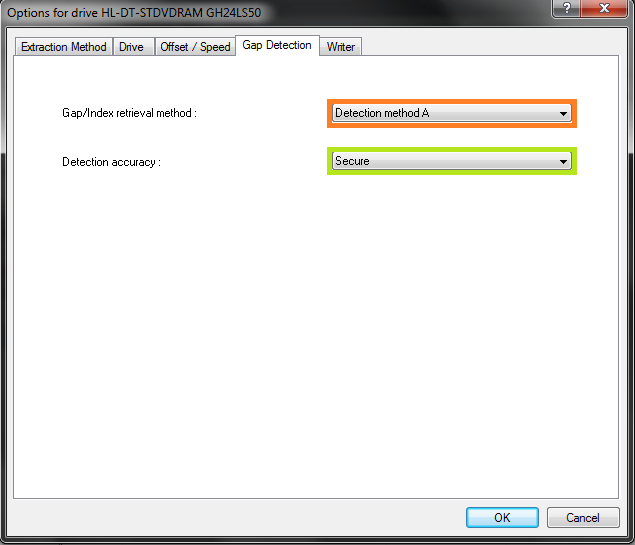
  • For gap detection, start with Method A. If your drive stalls or reports obviously wrong gaps, try B or C.
NMP note: Drive behavior varies. The goal is a secure rip with usable log evidence, not simply the fastest rip.
Exact Audio Copy setup screenshot for Configure drive options
Extraction Method tab with secure mode, Accurate Stream, cache, and C2 settings.
Exact Audio Copy setup screenshot for Configure drive options
Drive tab with read command and drive behavior options.
Exact Audio Copy setup screenshot for Configure drive options
Offset / Speed tab with AccurateRip read offset and speed settings.
Exact Audio Copy setup screenshot for Configure drive options
Gap Detection tab with Method A and secure detection accuracy.
Attribution: screenshots and step structure are adapted from the original public EAC ripping guide by caaok. The EAC download button points to the current Exact Audio Copy alternative servers page.